NEW

Add-on v0.1.6

A Blender add-on for
render monitoring via Telegram.

One live status message Live Telegram updates Progress & ETA Share a render link Blender 5.0+ macOS & Windows

Know your render
from anywhere.

Step outside, touch some grass, grab a coffee — Finished? keeps the render status clear in Telegram while Blender keeps working.

One live status

Progress stays in one clean Telegram message.

Timing that matters

Frames, elapsed time and ETA at a glance.

Share the view

A temporary read-only link for one render.

Current render

interior_final.blend

Rendering

Animation image sequence · Cycles

12 / 1408.6%

Finishes around 15:42

Elapsed09:12
Remaining1:47:30
Avg. frame45.8 s
Frame duration1–12
Render details
Engine
Cycles
Samples
256
Resolution
1920 × 1080
Format
PNG

HOW FINISHED? WORKS

A clear render status
in four simple steps.

Set it up once. Follow each animation render from Telegram.
  1. 1

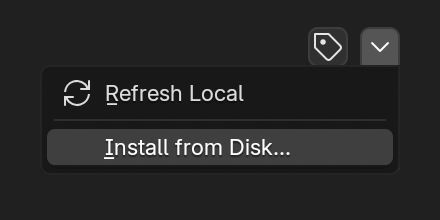
    Install the add-on

    Add Finished? to Blender 5.0+.

    Installing the Finished? add-on from Blender preferences
  2. 2

    Connect Telegram

    Open the Finished? bot and link your Blender device once.
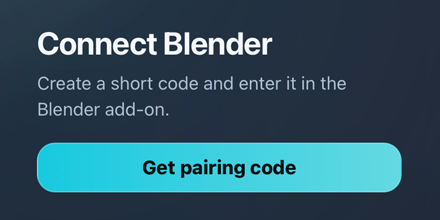
    Getting a pairing code to connect Finished? with Telegram
  3. 3

    Start an animation render

    Use “Render Animation with Finished?” from Blender.
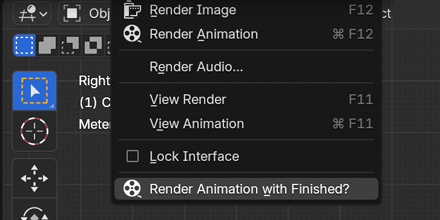
    The Render Animation with Finished? action in Blender
  4. 4

    Follow the live status

    One Telegram message keeps progress, timing and ETA up to date.
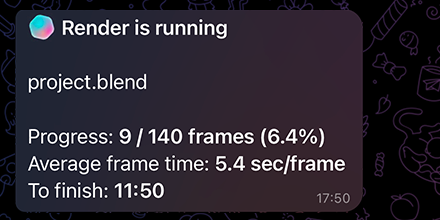
    A Finished? render status update in Telegram

Keep your render
in sight.

Install Finished? and follow every animation render from Telegram.